
ToolWiz Photo Editor6.1 - Download
You'll be able to download in few seconds.
Publisher Description
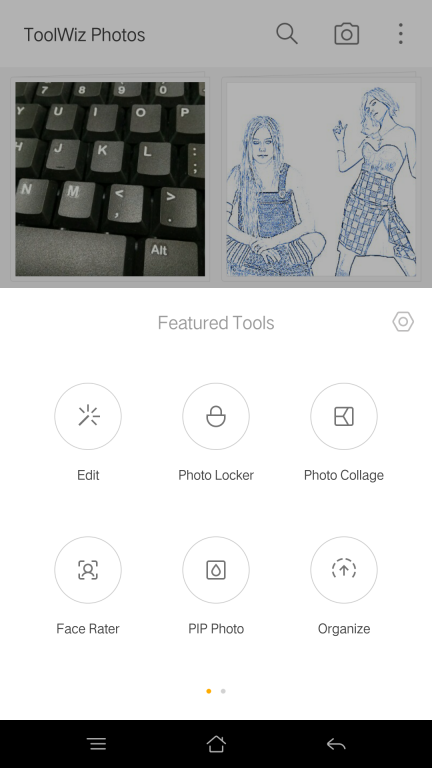
Photo Editing -Image: Rotate, Crop, Perspective, Resize, Reshape, Flip, Expand, Shrink -Color: Brightness, Temperature, Tint, Contrast, Toning, White Balance, Color Balance -Light: , Exposure, Highlights and Shadows, Natural Saturation -Detail: Clarity, Defog, Sharpening, De-noise, Retinex -Auto: Equalization, Auto Levels, Auto Contrast, Auto Gamma Correct -Levels and RGB Curve tools -Desaturate: Classic, High-Contrast, Max Channel, Min Channel, General -Blur:Gaussian, Zoom Blur, Radial, Box, Stack Blur -Invert, Threshold, Posterize, Kaleidoscope, Polar Coordinates -Painting:Fire, Color Lead Painting, Quick Sketch, Line Drawing, Oil Painting, Gouache, Abstract, Wall Painting -Effect: Sunlight, Fisheye, Vignette, Flare, Color Ribbon, Knit, Crystal, Film -Filters: Landscape, People, Glamour Glow, Grainy Film, LOMO, Flatten, Art, Strong, Vintage, 20+ Fast Filters -Cutout: Magic wand, Auto cutout, Eraser -Drawing: Doodle, Mosaic, Free Draw, Text, Line, Circle, Rectangle Photo and video locker -Lock your photos or videos in private album to have full control of what people see when they get hands on your phone. -Fake album to save you from awkward situation if others want to check your private album. -Automatically take pictures of intruders who tried to peep your private photos and videos. Fast browsing -Load thousands of pictures within seconds and allow you to easily sort, rename, hide, move and create new photo albums. Photo organizing -Move thousands of photos get organized in an instant. Tap to make albums tidy. Recycle Bin -Deleted photos can also be restored within 7 days. Smart storage saving -Compressing photos to save 70% of the storage without quality loss. -Simply find and remove duplicate photos. Intelligent face analysis - Intelligent beauty analysis to tell you who is most beautiful in one photo. Tag and search system -Add as many tag as you want and search photos or videos via them. -Search photo by date, location, type, tag
About ToolWiz Photo Editor
This Gallery & Cataloging Tools program is available in English, ChineseSimplified, ChineseTraditional, French, German, Hindi, Korean, Portuguese, Russian, Spanish. It was last updated on 29 September, 2026. ToolWiz Photo Editor is compatible with the following operating systems: Android.
The company that develops ToolWiz Photo Editor is Toolwiz Soft. The latest version released by its developer is 6.1.
The download we have available for ToolWiz Photo Editor has a file size of 25.2 MB. Just click the green Download button above to start the downloading process. The program is listed on our website since 2016-02-04 and was downloaded 0 times. We have already checked if the download link is safe, however for your own protection we recommend that you scan the downloaded software with your antivirus. Your antivirus may detect the ToolWiz Photo Editor as malware if the download link is broken.
How to install ToolWiz Photo Editor on your Windows device:
- Click on the Download button on our website. This will start the download from the website of the developer.
- Once the ToolWiz Photo Editor is downloaded click on it to start the setup process (assuming you are on a desktop computer).
- When the installation is finished you should be able to see and run the program.
Program Details
General
System requirements
Download information
Pricing
Version History
version 6.1
posted on 2016-02-04
1. +Resize image in image cropping
2. + Perspective stretching
3. +Cutout
4. +Photo Mixer
5. +Reshape with skew, bloat and shrink
6. Black Theme changer is back
Disclaimer
External Download
We do not host ToolWiz Photo Editor on our servers. We did not scan it for viruses, adware, spyware or other type of malware. This app is hosted by the software publisher and passed their terms and conditions to be listed there. We recommend caution when installing it.
The external download link for ToolWiz Photo Editor is provided to you by apps112.com without any warranties, representations or guarantees of any kind, so access it at your own risk.
If you have questions regarding this particular app contact the publisher directly. For questions about the functionalities of apps112.com contact us.
